

After weeks – maybe even months – of hard work, the day is finally here: your new website is live! Cue the confetti. Pour the champagne. Post the Instagram story.
And now you can just sit back, relax and watch the dream clients roll in… right? Well. Not quite.
Because as much as we’d all love for a beautiful new website to magically bring in leads overnight, your website does need a little help. Once your site is live, the real work begins: getting people to find it, click on it, trust you and eventually book or buy from you.
So before you disappear into the sunset thinking your website is “done forever” – please don’t – here are a few important things to do after your website launch. Let’s get into it.
1. Add your sitemap to Google Search Console
You, your friends, your Instagram followers and probably even your grandma know your new website is live… but that doesn’t mean Google does.
Google will find your website eventually, but why sit around waiting for that to happen when you can give it a little nudge? That’s where adding your sitemap to Google comes in.
A sitemap is basically a list of all the pages on your website. It helps Google understand what’s on your site and which pages it can show in search results.
You can submit your sitemap through Google Search Console. This helps Google discover your website faster and gives you a little more control over which pages you do – and don’t – want to show up in search results.
Want to learn how to do this?
READ THE BLOG
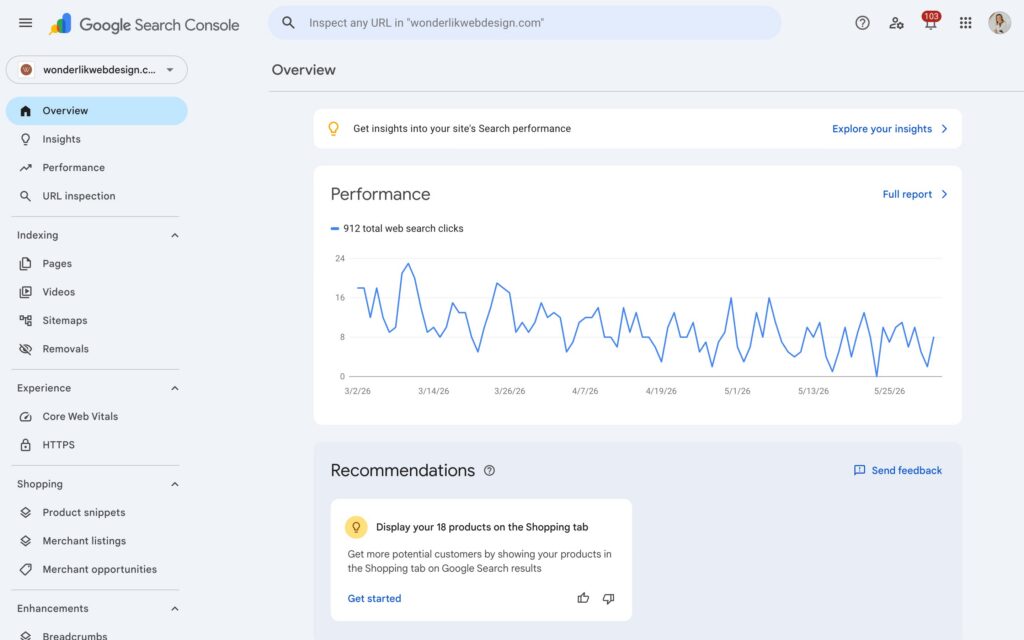
Google Search Console also gives you some really useful information, like:
- Indexing: You can see whether Google can actually find and read your website. Very useful, because if Google can’t read it, Google can’t rank it.
- Performance: You can see how often your website appears in Google, which search terms people use to find you, and how many people actually click through to your site.
Links: You can see which websites are linking to yours. - … and more!
2. Create a Google Business Profile
A Google Business Profile is one of those things that feels a little boring to set up… until you realize it can actually help people find you more easily.
With a Google Business Profile, you can control how your business shows up in Google Search and Google Maps. You’ve probably seen it before: that little info box that appears when you Google a business, with the name, website, photos, opening hours, reviews and all the practical details.
Basically: it helps Google understand that your business exists. Which is, you know, kind of important.
It also gives people a quick overview of who you are, what you do and how they can contact you. Plus, you can collect reviews and reply to them, which instantly helps build trust. Because let’s be honest: people love a little social proof before they hand over their money!
And even if you don’t have a physical shop or studio, this can still be useful. You can often set up your profile as a service-based business and choose whether or not to show your address.
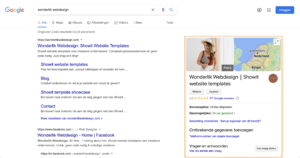
The benefits of having a Google Business Profile
- Your business becomes easier to find in Google.
- You can show important information like your website, contact details and opening hours.
- You can collect reviews and reply to them.
- You can add photos, updates and helpful business info.
People can ask questions, and you can answer them.
How to create a Google Business Profile
Dat doe je door onderstaande stappen te volgen:
Here’s how to set it up:
- Go to Google Business Profile and log in with your Google account. Ideally, use your business account so everything stays nice and organized.
- Fill in your business name and add the important details, like your business category, address, opening hours and website.
- Then follow the setup steps.
- Google will usually ask you to verify your business. The available verification methods can vary, but in many cases, you’ll receive a verification code by post. Once you receive the code, log back into your Google Business Profile and verify your business.
After that, you can update your business details, collect reviews, add photos and manage everything from your dashboard!

3. Changed your domain name? Don’t forget to set up redirects
Did you already have a website before this one? And did your domain name change because of a rebrand, new business name or fresh start? Then please don’t just let your old website float around the internet like a ghost.
If your old domain still exists, you’ll want to redirect it to your new domain. This means that when someone visits your old website link, they’ll automatically be sent to your new website.
You’ll also want to tell Google about the address change, so it understands that your website has moved.
This is especially important if your old website already had some traffic or Google rankings. You don’t want to lose all that SEO goodness just because your domain changed!
Want to learn more about keeping your Google ranking when moving to a new website?
READ THE BLOG4. Connect Google Analytics
Your website is live and looking gorgeous. Amazing. But now we need to know what’s actually happening on it. Are people visiting? Where are they coming from? Which pages are they reading? Are they clicking around or leaving after five seconds?
This is where Google Analytics comes in.
Google Analytics helps you understand how people use your website. And yes, numbers can feel a little boring, but these numbers actually tell you what’s working and what needs attention.
For example:
- If your website isn’t getting visitors from Google, that could be a sign you need to work on your SEO.
- If people are leaving your website really quickly, that could mean something is confusing, slow, unclear or not quite doing its job.
- If one page gets lots of visits but no inquiries, that page may need a stronger call to action.
Basically, Google Analytics helps you stop guessing and start making smarter decisions.
Want to learn how to connect Google Analytics to your Showit website?
READ MORE5. Update your socials and other links
This one sounds obvious, but you’d be surprised how often it gets forgotten! You launch a new website, celebrate it on Instagram, feel very productive… and then six weeks later your old link is still sitting in your email signature. Not great.
So once your new site is live, update your website link everywhere people might find you.
Think of:
- your Instagram bio
- your Facebook page
- your Pinterest profile
- your email signature
- your Google Business Profile
- your newsletter footer
- your client documents
- your pricing guide
- …
Basically, if your website link exists there, update it.
And don’t be shy about promoting your new website either. People are busy. They may have missed your first announcement. Or your second. Or your very carefully designed launch post that took 45 minutes to make. 😉
So talk about it. Share it. Show people what’s new. Tell them where to go: your shiny new website!
6. Keep your website alive
This might be the most important tip in this whole blog: please, for the love of god and good SEO, don’t launch your website and then abandon it for the next five years.
Keeping your website updated is important for your visitors, because nobody enjoys landing on a website that still says “currently booking 2021”. But it’s also important for search engines like Google. Google wants to show people helpful, relevant and up-to-date information.
So if Google sees that your website is regularly updated with useful content, that’s a good sign. It shows your website is active, current and worth paying attention to.
But if you never update your site? Your rankings can slowly drop. Not because your website suddenly became bad. But because other people are actively improving theirs. And Google is basically looking around like, “Okay, who’s actually keeping things fresh around here?”.
Keep your website alive by blogging regularly
If you have an online shop, keeping your website active usually happens naturally. You add new products, update prices, refresh collections and change your offers. But what if your services don’t change that often? Like what if you’re a photographer, interior designer, coach, copywriter or another service-based business?
That’s where blogging becomes your best friend.
Every new blog post gives your website another chance to show up in Google for specific keywords. As long as the blog is actually helpful and optimized properly for SEO, of course. We’re not just throwing words onto the internet and hoping for the best!
Blogging also helps your visitors. It shows them that you know what you’re talking about. It answers their questions. It builds trust. It gives them a reason to stay on your website longer.
And no, this does not mean you need to write a new blog every week. A great starting point is one blog per month. If you have more time, energy and ideas, amazing. Write more. But one good, helpful blog post a month is already better than nothing!
You can also update your existing blogs. Add new links, refresh outdated info, include extra tips, add images or expand sections that could use more detail. Google sees those updates too!
Conclusion
So, your website is live. Amazing! But now it’s time to make sure people can actually find it.
After launching your website, make sure you submit your sitemap, set up your Google Business Profile, connect Google Analytics, update your links, set up redirects if needed and keep your website fresh.
Because a beautiful website is great. But a beautiful website that actually gets found, builds trust and brings in clients? That’s the real goal.
And now? Time to get to work. Google is not going to impress itself!

Ever wondered what tools I rely on daily to keep my website, marketing and workflow running smoothly? I've put together a list just for you so you can spend more time doing what you truly love!
My favorite tools & resources for creatives
Read more ...